> For the complete documentation index, see [llms.txt](https://docs.wiclax.com/llms.txt). Markdown versions of documentation pages are available by appending `.md` to page URLs; this page is available as [Markdown](https://docs.wiclax.com/en/use-wiclax/entering-importing-participants/importing-participants.md).
# Importing participants
## File import
You can import an entry list from an external file. It can be an Excel file or any formatted file with a csv or txt extension.\
It can also be a Wiclax file if you want to get the entry list from another event.
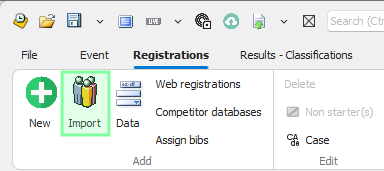
You can open the assistant to import participants by clicking `Import` in the ribbon.\
\
In the first import window, you have two options :\
\- you can select a path for a file to import or a URL form an online file.\
\- you can check `Import from clipboard` to import data you have copied previously. This is often the best option especially for formatting issue and file access conflict.
By clicking the Open button, a window opens displaying a preview of your file's content.
The main import settings are:
* the field separator (for text files)
* The number of header lines to skip
* The processing masks for birth dates or start times
#### Column Mapping
Mapping columns to race data can be done either by clicking on the header of the desired column to open a selection menu, or more quickly via the keyboard by typing the first letters of the target field—for example, 'bi' for bib number—and then moving to the next column using the arrow keys.
{% hint style="warning" %}
Designating a column for the Bib Number (or Chip ID) is generally mandatory, unless you allow Wiclax to perform an automatic number assignment.
{% endhint %}
{% hint style="info" %}
If bib number ranges are assigned to different races, the imported participants will be automatically assigned to their respective race.
{% endhint %}
{% hint style="info" %}
This page is a work in progress. You can read the french version here :
{% endhint %}
#### Validation
Validation executes the import. You will be notified of the number of participants added and/or updated. The data preview screen allows you to immediately detect any inconsistencies.
For multi-stage events, the import can be targeted to a specific stage only or applied to all stages.
#### Updates
As long as bib numbers are included in the imported data, you can run the same import process multiple times. This allows you to either add new participants who haven't been imported yet or update data for existing ones.
For example, you can import a file specifying only the "Bib" and "Club" columns to fill or update club information. All other participant data will remain unchanged.
If you wish to integrate only new participants without overwriting data for existing participants that may have been modified in the race, uncheck the option Update existing bib data in the first step of the wizard.
#### Import Templates
The Templates dropdown menu allows you to quickly retrieve a file configuration (separator, columns, etc.) if you need to reuse the same file format. To save the current configuration as a template, click the '+' button next to the list and provide a name to identify it.
#### Copy-Paste
ou can simply press Ctrl+V on the participants grid after copying data to your clipboard (for example, from an Excel file or another Wiclax file).
The process is identical to a file import, with the import wizard appearing to guide you through the next steps.
#### Merging Teammates
In the first step of the import wizard, an option Merge teammates into a single registration line is available.
This assumes the source data contains multiple rows of participants with the same bib number. As a result, the import will create only one participant entry, with the first and last names of all teammates concatenated.
---
# Agent Instructions
This documentation is published with GitBook. GitBook is the documentation platform designed so that both humans and AI agents can read, navigate, and reason over technical content effectively. Learn more at gitbook.com.
## Querying This Documentation
If you need additional information that is not directly available in this page, you can query the documentation dynamically by asking a question.
Perform an HTTP GET request on the current page URL with the `ask` query parameter, and the optional `goal` query parameter:
```
GET https://docs.wiclax.com/en/use-wiclax/entering-importing-participants/importing-participants.md?ask=&goal=
```
`ask` is the immediate question: it should be specific, self-contained, and written in natural language.
`goal` is optional and describes the broader end goal you are ultimately trying to accomplish on behalf of the user. GitBook uses it to tailor the answer towards what is most useful for that goal.
The response will contain a direct answer to the question and relevant excerpts and sources from the documentation.
Use this mechanism when the answer is not explicitly present in the current page, you need clarification or additional context, or you want to retrieve related documentation sections.