> For the complete documentation index, see [llms.txt](https://docs.wiclax.com/llms.txt). Markdown versions of documentation pages are available by appending `.md` to page URLs; this page is available as [Markdown](https://docs.wiclax.com/en/use-wiclax/live-results-broadcast/g-live-app/photos-and-videos.md).
# Photos and videos
Managing videos or photos associated with an event begins with the Web publication screen.
## Finish Line Videos
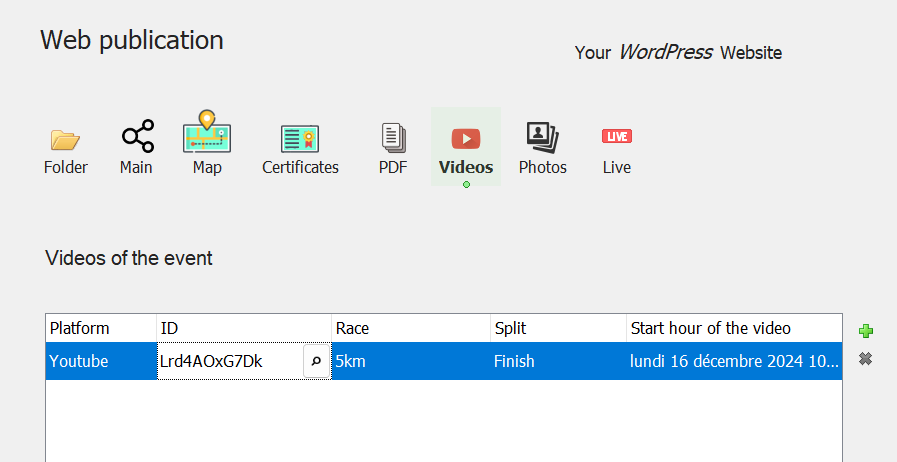
It is possible to associate one or more online videos with the event. A video is to be designated by the platform that hosts it (typically Youtube) and its identifier. By specifying the date and time at which it starts, G-Live will be able to time its playback to the time of the competitors' passage.
on the Web publication screen
In case the platform used is not listed, you can provide the full URL to access the video instead of its identifier (sharing URL).
The number of videos for an event is not limited. For each of them it is possible to specify to which stage, which race(s) and/or which checkpoint it relates.
The videos will be presented on a competitor's summary on the G-Live. And their playback will start a few seconds before their actual passage on the timed line.
## Photos of athletes in action
These are photos taken by you or a service provider at a timed point, such as the finish line or an intermediate checkpoint. The photos timestamp (distinct from the file creation date) enables them to be displayed based on the time an athlete you've clocked passes through.
In this case, the photos must be placed in a folder */photos* created under the folder containing the .clax file of the event. This folder is itself organized into several subfolders: */start*, */finish*, */split\_1*, */split\_2*, ... which each group the images of a checkpoint of the race.
* The *Athlete Photos Online* option must be enabled for the event
* In the case of a stage race, the photos are expected in the folder */photos/2/finish* for example, for the finish of stage 2
* The intermediate split points indexes correspond to their order of declaration on the event, all races combined and start at 1
* The timestamp taken into account for the images is the one recorded with the jpeg details, not the creation/modification dates of the files. This method assumes however that the time of the camera device was roughly in sync with the race time.
* Images are selected within a time frame of a few seconds before and after the competitor's known lap time, and may of course include photos of other competitors who have passed within that interval.
* This feature requires PHP to be implemented on the server. It is not testable on local G-Live.
## Avatars
An avatar or profile picture is an image that represents an athlete, regardless of their performance in the event.
The conditions for displaying an avatar image are as follows:
* the image has a .jpg extension
* it is named according to the athlete's bib number, for example 255.jpg for bib 255. Alternatively the *Web Registration Id* data can replace the bib, if you use it in this context to serve as a common identifier for several events.
* It has a maximum width of 150 pixels, otherwise it will be displayed below the athlete's results
The event settings are done here, by specifying in which folder (relative to that of the online event) the images are located:
## Photo Partner
If the event photos are available on the Sport Pxl platform, all you have to do is select this platform and enter the Sport Pxl identifier associated to the event.
On the published rankings G-Live will link to the platform to display photos of each athlete and provide a link to find out more.
---
# Agent Instructions
This documentation is published with GitBook. GitBook is the documentation platform designed so that both humans and AI agents can read, navigate, and reason over technical content effectively. Learn more at gitbook.com.
## Querying This Documentation
If you need additional information that is not directly available in this page, you can query the documentation dynamically by asking a question.
Perform an HTTP GET request on the current page URL with the `ask` query parameter, and the optional `goal` query parameter:
```
GET https://docs.wiclax.com/en/use-wiclax/live-results-broadcast/g-live-app/photos-and-videos.md?ask=&goal=
```
`ask` is the immediate question: it should be specific, self-contained, and written in natural language.
`goal` is optional and describes the broader end goal you are ultimately trying to accomplish on behalf of the user. GitBook uses it to tailor the answer towards what is most useful for that goal.
The response will contain a direct answer to the question and relevant excerpts and sources from the documentation.
Use this mechanism when the answer is not explicitly present in the current page, you need clarification or additional context, or you want to retrieve related documentation sections.