> For the complete documentation index, see [llms.txt](https://docs.wiclax.com/llms.txt). Markdown versions of documentation pages are available by appending `.md` to page URLs; this page is available as [Markdown](https://docs.wiclax.com/en/use-wiclax/live-results-broadcast/g-live-app/maps.md).
# Maps
The Mapping option is an additional option to the software licence, which you can purchase initially or during the period of validity of the licence. It enables you to put race routes for an event online, locate time points or other points of interest, view elevation profiles and, in conjunction with a geotracking service, display live position information for participants.
### Upload routes
Race tracks have to be provided as GPX files. Those files can be uploaded from the Web publication screen to be made available online.
This may be the main route for the event, or several separate routes if the event comprises several races or even several stages with different routes.
In the case of an event with segments, such as a triathlon, a separate track can also be provided for each segment.
{% hint style="info" %}
Wiclax includes a GPX file minification process (notably by deleting formatting spaces or timestamp data). However, it is advisable to check with your webmaster that files with a .gpx extension will be served compressed (gzip).
{% endhint %}
### Puntos de control
Split points with associated time and ranking information for riders are displayed automatically once you have defined their GPS coordinates in Wiclax (pointing properties, latitude and longitude entry or manual positioning on the map). The positioning of starts and finishes is not required, as it is deduced from the route data.
### Point of interest
Also from the `Web publication` window, you can edit a track file and add points of interest, such as refreshment points.
### Map collections
The application is delivered by default with the Open Street Map background and the Google Sat satellite view, which can be selected from the application interface. Other possibilities may be possible depending on your region/country, depending in particular on the licence conditions that may apply (for example, the IGN backgrounds for France will be dependent on a licence that you must subscribe to specifically for your site, which is free up to a certain volume of requests). Please do not hesitate to contact us on this subject.
{% hint style="info" %}
Default layer: you can change the layer that is displayed by default when an event is loaded, via the settings in the G-Live application.
{% endhint %}
### Live follow-up
When a Live session is active, the passage counters will update in real time on the General map tab. This can be used as a race dashboard.
### Predictive times
During the race, predictive split times and virtual positions are displayed for the participants.
Please note: to ensure realistic estimates, these are not calculated immediately but progressively as the race unfolds. Specifically, for an estimate to appear at a checkpoint, the following conditions must be met:
* The competitor must already have at least one recorded split time.
* At least one leader from their race must have passed through that checkpoint.
{% hint style="info" %}
When testing the feature, remember that the time of the PC or phone from where you're browsing the results is taken as a reference for calculations.
{% endhint %}
### Geotracking
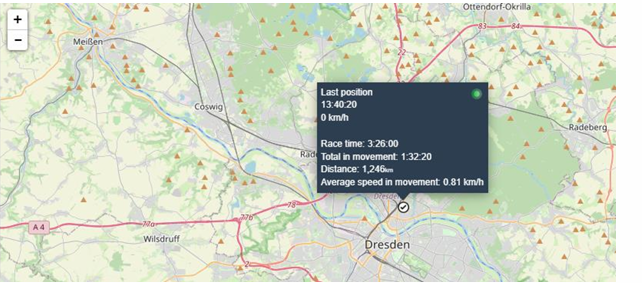
The Geotracking function enables live positioning data supplied by a third-party service to be integrated into the G-Live application.
{% hint style="info" %}
The Dotvision and Racemap APIs are currently available.
{% endhint %}
The event parameters are set from the `Web publication` window, where as well as activating geotracking you will need to enter the event identifier(s) for the platform. Participant data must also be present on the platform, in particular the bib number, which is used for searches.
The G-Live app will then provide the following services:
* Displays the current position on a rider's results sheet. The position is automatically refreshed at regular intervals.
* Display of a race leader board showing all the participants being tracked (their current position on the map) and giving an instant ranking as calculated by the third-party service on the basis of their positions.\
\##screenshot to be added.
---
# Agent Instructions
This documentation is published with GitBook. GitBook is the documentation platform designed so that both humans and AI agents can read, navigate, and reason over technical content effectively. Learn more at gitbook.com.
## Querying This Documentation
If you need additional information that is not directly available in this page, you can query the documentation dynamically by asking a question.
Perform an HTTP GET request on the current page URL with the `ask` query parameter, and the optional `goal` query parameter:
```
GET https://docs.wiclax.com/en/use-wiclax/live-results-broadcast/g-live-app/maps.md?ask=&goal=
```
`ask` is the immediate question: it should be specific, self-contained, and written in natural language.
`goal` is optional and describes the broader end goal you are ultimately trying to accomplish on behalf of the user. GitBook uses it to tailor the answer towards what is most useful for that goal.
The response will contain a direct answer to the question and relevant excerpts and sources from the documentation.
Use this mechanism when the answer is not explicitly present in the current page, you need clarification or additional context, or you want to retrieve related documentation sections.